

How to Model Product Variants Without Creating Confusing Stock and Catalogue Data
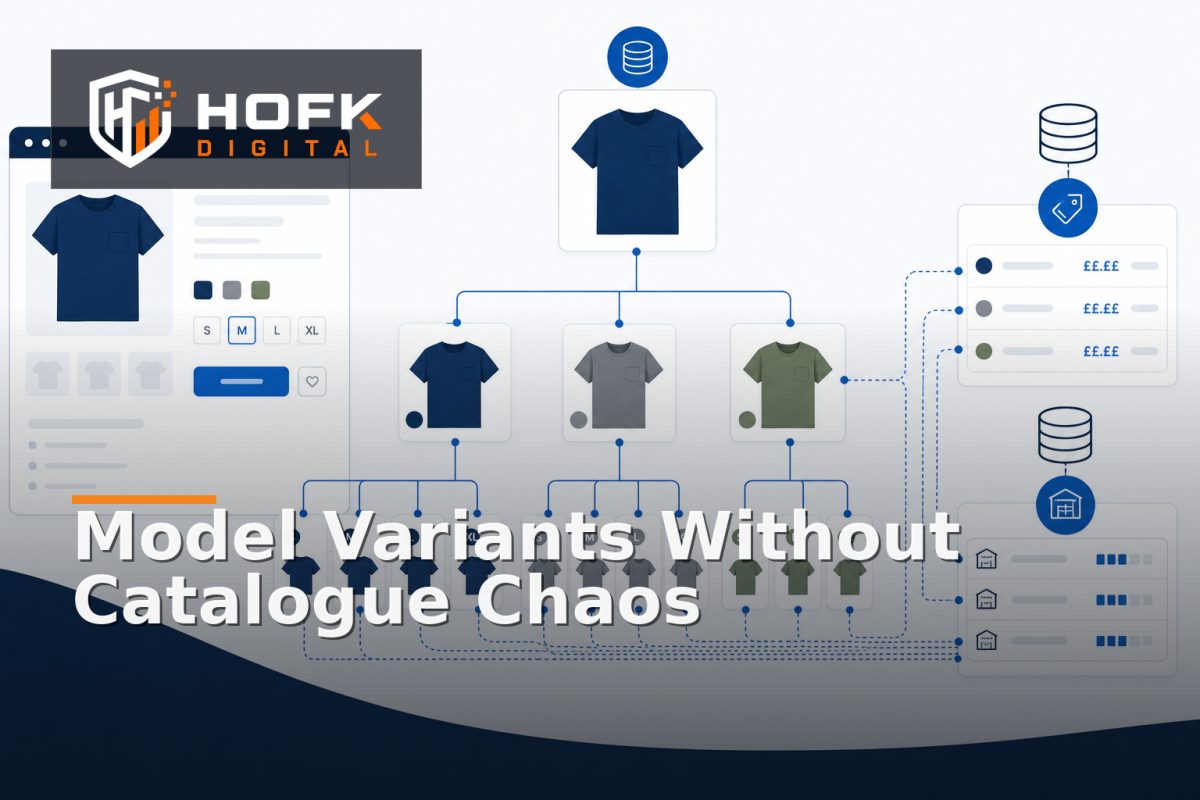
A product catalogue can look organised in a spreadsheet while still being difficult for an ecommerce platform, PIM, ERP or feed to interpret. The usual cause is that several different concepts have been combined into one record: the product customers browse, the variant they select, the offer they buy and the stock item operations need to fulfil.
That is why an ecommerce product variant data model matters. It gives each concept a clear job and defines the relationships between them. Without that separation, product variant management becomes a series of exceptions: one system stores colour as a product, another stores it as an option, and a third expects every sellable combination to have its own SKU.
This guide sets out a practical model for UK ecommerce teams, catalogue owners, product managers and developers. The aim is not to prescribe one platform schema. It is to help you create catalogue data that remains understandable when products, variants, prices, stock, feeds and fulfilment workflows all need to work together.
Start by separating four different things
The first modelling decision is to stop treating every product-related record as the same type of object. A useful starting model has four layers.
- Catalogue product: the customer-facing concept, such as “Oxford Shirt”.
- Variant: a specific configuration, such as blue, medium.
- Offer: the commercial terms under which that item can be bought, such as a retail price, trade price or promotional price.
- Stock item: the inventory or fulfilment record that identifies what is physically available.
These layers may be represented differently depending on your platform. The important point is that they should not be confused. A product can have many variants. A variant can have several offers for different customer groups. A stock item may be held in one or more locations.
When these concepts are separated, a price change does not need to alter the catalogue relationship, and a warehouse adjustment does not need to rewrite product copy.
Define the catalogue product as the parent concept
The catalogue product is normally the entity a shopper recognises and a merchandiser manages. It should contain information that is common across the range rather than information that changes for every sellable combination.
Typical parent-level fields include:
- Product name and customer-facing description
- Brand and broad product type
- Category relationships
- Shared care, usage or specification information
- Product-level imagery where it applies to the full range
- Search and merchandising metadata
A parent product should not usually be the only place where a SKU, stock quantity or variant-specific price is stored. Those values belong lower in the model.
For example, “Oxford Shirt” can be the parent product, while “Oxford Shirt / Blue / Medium” is a variant. If the parent record also stores one arbitrary SKU and stock figure, other systems may incorrectly treat the parent as directly sellable.
Model variants as sellable combinations
A variant should represent a distinct configuration that can be selected, priced, ordered or fulfilled. In a simple size-and-colour range, each valid combination may be a variant:
- Blue / Small
- Blue / Medium
- White / Small
- White / Medium
Each sellable variant should have a stable identifier. In many businesses, that will be a SKU, but it is useful to distinguish between an internal variant ID and an externally visible SKU.
A practical variant record may include:
- Variant ID
- Parent product ID
- SKU or merchant-facing identifier
- Variant attribute values
- Barcode or GTIN where applicable
- Variant-specific image references
- Packaging, dimensions or fulfilment information
- Lifecycle status, such as active, discontinued or archived
The variant should reference its attribute values rather than embedding inconsistent text in several fields. For example, use a controlled colour value such as “Blue” rather than allowing “blue”, “navy blue” and “BLU” to appear interchangeably unless those are genuinely different commercial options.
Do not create variants for every descriptive difference
Not every product attribute needs to create a new variant. A colour or size that changes what the customer orders usually does. A marketing label such as “best seller” usually does not.
Use a variant when the difference affects at least one of these:
- What the customer selects
- What the warehouse fulfils
- What the customer pays
- What stock is tracked
- What identifier is sent to a downstream channel
If a field only changes presentation or merchandising, it may belong on the product or offer instead.
Keep catalogue relationships separate from stock relationships
Catalogue relationships describe how products relate to one another for browsing and discovery. Stock relationships describe how items are stored, allocated and fulfilled. They are related, but they are not the same.
A product may be related to:
- A parent product and its child variants
- Accessories or complementary products
- A substitute or alternative product
- A bundle or kit
- A replacement or superseding item
Those relationships should not be used to imply stock ownership. An accessory can be related to a product without being included in its stock record. A bundle can contain several stock items without becoming one physical item in the warehouse.
This distinction is central to catalogue product relationships. Give each relationship a type and, where useful, a direction. “Accessory for” is different from “replacement for”, and “contains” is different from “recommended with”.
Model stock at the level you actually fulfil
Variant stock modelling becomes clearer when you ask a practical question: what does the warehouse or fulfilment team actually pick, reserve or dispatch?
If the answer is an individual sellable SKU, stock should normally be attached to that variant or to a dedicated inventory item linked to it. Do not store one parent-level quantity and expect every channel to infer which child variants are available.
A stock record may need to include:
- Stock item or SKU reference
- Location or warehouse
- Available quantity
- Allocated or reserved quantity
- On-order quantity
- Sellable or unavailable status
- Last updated timestamp
Whether these states are stored in one system or calculated from transactions will vary. VERIFY: confirm which stock state your ecommerce platform, ERP and fulfilment workflow treat as the customer-facing availability value.
For multi-location businesses, avoid overwriting stock with one global number unless that is genuinely the commercial model. A product can be available in one warehouse and unavailable in another, while delivery rules determine whether the customer can buy it.
Keep pricing and offers out of the base variant where possible
One variant may have more than one commercial price. A standard retail customer, trade account and contract customer may all receive different terms. Promotions can also change the price temporarily.
That is why it is often cleaner to model an offer separately from the variant. An offer can reference:
- Variant ID
- Customer group or account tier
- Currency and tax treatment
- Base price or price list
- Quantity breaks
- Promotion dates
- Channel or market restrictions
This prevents a customer-specific price from being mistaken for the permanent product price. It also reduces the risk of overwriting the base catalogue when a campaign starts or a trade account receives negotiated terms.
HOFK’s related guide on customer-specific price cache drift in a B2B ecommerce portal covers the display and session risks that can appear when account pricing is not kept separate from other product states.
Choose identifiers that survive system handoffs
Identifiers are the joins between catalogue, stock, orders, feeds and analytics. A clear model should define which identifier is used for which purpose.
Common identifiers include:
- Product ID: identifies the parent catalogue concept.
- Variant ID: identifies a specific configuration inside the catalogue.
- SKU: identifies the sellable or operational item used by the business.
- Barcode or GTIN: identifies the item for relevant external channels.
- Offer ID: identifies a price or commercial arrangement.
- Stock item ID: identifies the inventory record where this is separate from the variant.
Do not assume one field can safely perform every role. A SKU may change during a migration, while an internal variant ID should remain stable. Conversely, a marketplace may require a particular identifier that is not suitable as the internal database key.
Document whether identifiers are immutable, when they can change and how legacy values are retained. This is particularly important during replatforms and ERP or PIM integrations.
Test the model with difficult catalogue cases
A data model is not ready because it works for one simple product. Test it against the cases that expose ambiguity.
- Single-SKU product: does the model avoid creating unnecessary variant complexity?
- Size and colour product: can each valid combination be identified and stocked?
- Bundle: can the catalogue show one offer while fulfilment still sees its component items?
- Made-to-order item: can availability be represented without pretending there is a fixed stock quantity?
- Discontinued variant: can one child be retired while the parent remains active?
- Customer-specific pricing: can different offers exist without duplicating the product?
If the team needs a special spreadsheet rule for every one of these cases, the underlying model may be mixing catalogue, commercial and operational concepts.
Set rules for channel exports
Downstream channels do not always use the same product model as your internal systems. A shopping feed may need parent-child item groups. A marketplace may expect one listing per sellable variant. Your storefront may display one product page with selectable options.
Do not force every channel taxonomy or feed format into the core catalogue model. Instead, define controlled transformations:
- Which parent and child identifiers are exported
- Which attributes become channel variant values
- How unavailable variants are handled
- Which price and stock state is sent
- How bundles and grouped products are represented
HOFK’s guide to category mapping governance for Merchant Centre and PIM is relevant here because channel mappings should be treated as governed transformations rather than informal edits.
A practical ecommerce product variant data model checklist
- Separate parent products, variants, offers and stock records.
- Give each sellable variant a stable identifier.
- Use controlled values for colour, size, material and other option attributes.
- Record catalogue relationships with explicit relationship types.
- Model stock at the level the business actually fulfils.
- Keep customer-specific prices and promotions in offer structures.
- Document identifier ownership and migration rules.
- Test single-SKU products, variants, bundles and discontinued items.
- Define channel transformations without polluting the core model.
- Assign an owner for data definitions and future changes.
Where HOFK can help
HOFK works across ecommerce, full stack development, catalogue-connected workflows, SEO, Google Ads and operational software. In practice, a product variant data model often needs to work across more than one system: a storefront, PIM, ERP, feed, warehouse process and reporting layer.
The useful work may be reviewing the relationships, clarifying identifiers, improving a product data handoff or building the integration logic that keeps catalogue and operational records aligned. HOFK’s full stack development and ecommerce services are relevant where the model needs to be implemented across a live platform rather than documented in isolation.
Conclusion
A reliable ecommerce product variant data model separates the product customers browse from the variant they select, the offer they receive and the stock item the business fulfils. That separation makes product variant management easier to govern and reduces ambiguity between catalogue product relationships and variant stock modelling.
The best starting point is practical: define the parent product, identify each sellable variant, keep offers and inventory separate, choose stable identifiers and test the model against bundles, discontinued options and customer-specific pricing. Once those decisions are clear, your storefront, feeds, PIM, ERP and operational teams have a much stronger foundation to work from.
Frequently asked questions
What is an ecommerce product variant data model?
It is a structured way to represent parent products, sellable variants, prices, offers, stock and the relationships between them across ecommerce systems.
Should every variant have its own SKU?
If the variant can be selected, priced, ordered or fulfilled independently, it will usually need a stable sellable identifier such as a SKU. The exact identifier rules depend on the platform and operational system.
What is the difference between a product and a variant?
The product is the customer-facing catalogue concept. A variant is a specific configuration of that product, such as a particular size, colour or pack.
Should pricing be stored on the variant?
A base price may be associated with a variant, but customer-specific pricing, promotions and quantity breaks are often clearer when modelled as separate offers.
How should stock be modelled for variants?
Stock should normally be linked to the item the business actually reserves, picks or fulfils. For many catalogues, that is the individual sellable variant or an inventory record linked to it.