

How to Design B2B Ecommerce Reorder Lists for Faster Repeat Purchasing
A trade customer should not have to rebuild a familiar order from memory every time they return to your portal. If they regularly buy the same products, the quickest route should be clear: find a previous order, review the items and repeat the purchase with confidence.
That is the purpose of well-designed B2B ecommerce reorder lists. They turn past buying behaviour into a practical shortcut without treating historical orders as a simple copy-and-paste source. Prices may have changed, products may be discontinued, pack sizes may differ and some items may require approval before they can be ordered again.
This guide explains how UK B2B ecommerce teams can design reorder lists that are fast for customers and safe for the business. The focus is the repeat-purchase experience: what to show, how to handle changes, where approvals belong and how to connect the list to a dependable trade portal repeat ordering workflow.
What a B2B ecommerce reorder list should do
A reorder list should reduce the effort required to make a familiar purchase. It should not force the customer to search through the full catalogue, remember product codes or contact the sales team for information the portal already holds.
A useful reorder experience should help a customer:
- See products bought previously by their account.
- Understand when each item was last ordered.
- Choose quantities quickly.
- Identify products that have changed, been replaced or become unavailable.
- See the correct account price and applicable terms.
- Add selected items to a basket, quote or approval request.
The list should support a decision, not merely display historical data. A customer needs to know whether the item is still the right product to order today.
Choose the right source for the reorder list
There are several ways to create a reorder list, and they support different customer needs. The right option depends on how repeat purchasing works in your business.
Previous order-based lists
This approach shows items from one or more completed orders. It is useful where customers regularly repeat a known basket, such as packaging, consumables, trade supplies or replacement parts.
Display the original order date, quantity and product reference. Let the customer select individual lines rather than forcing them to repeat the entire order.
Account-specific favourites
A favourites or saved-items list lets customers build a reusable set of products independently of one previous order. This is useful when the customer buys from several orders or wants to prepare a standard list for different sites or branches.
Frequently purchased products
A frequency-based list can highlight products bought repeatedly by the account. Use this carefully. A product bought frequently in the past may no longer be suitable, available or commercially active.
For many trade portals, the strongest approach is a combination: show recent repeat items, allow customers to save preferred products and retain a link to the original order history.
Preserve account context throughout the experience
Repeat ordering is only useful when the portal knows which customer is ordering. A reorder list should be linked to the correct account, branch, delivery location, user role and pricing context.
Before allowing an item to move into the basket, confirm the relevant rules for:
- Parent account and branch relationship.
- Customer-specific price list or contract pricing.
- Permitted delivery addresses.
- Payment terms and credit restrictions.
- User permissions and delegated ordering rights.
- Product visibility or account-specific restrictions.
This is central to good account ordering UX. A list that is fast but shows the wrong price or allows the wrong user to bypass approval is not a successful reorder workflow.
HOFK's guide to testing account-tier pricing and trade-account ordering rules provides a useful related approach for validating account behaviour across the portal.
Show enough product detail to prevent mistakes
Repeat buyers may know a product well, but the list still needs enough information to distinguish similar items. This is particularly important where products have different sizes, colours, pack quantities, specifications or compatible equipment.
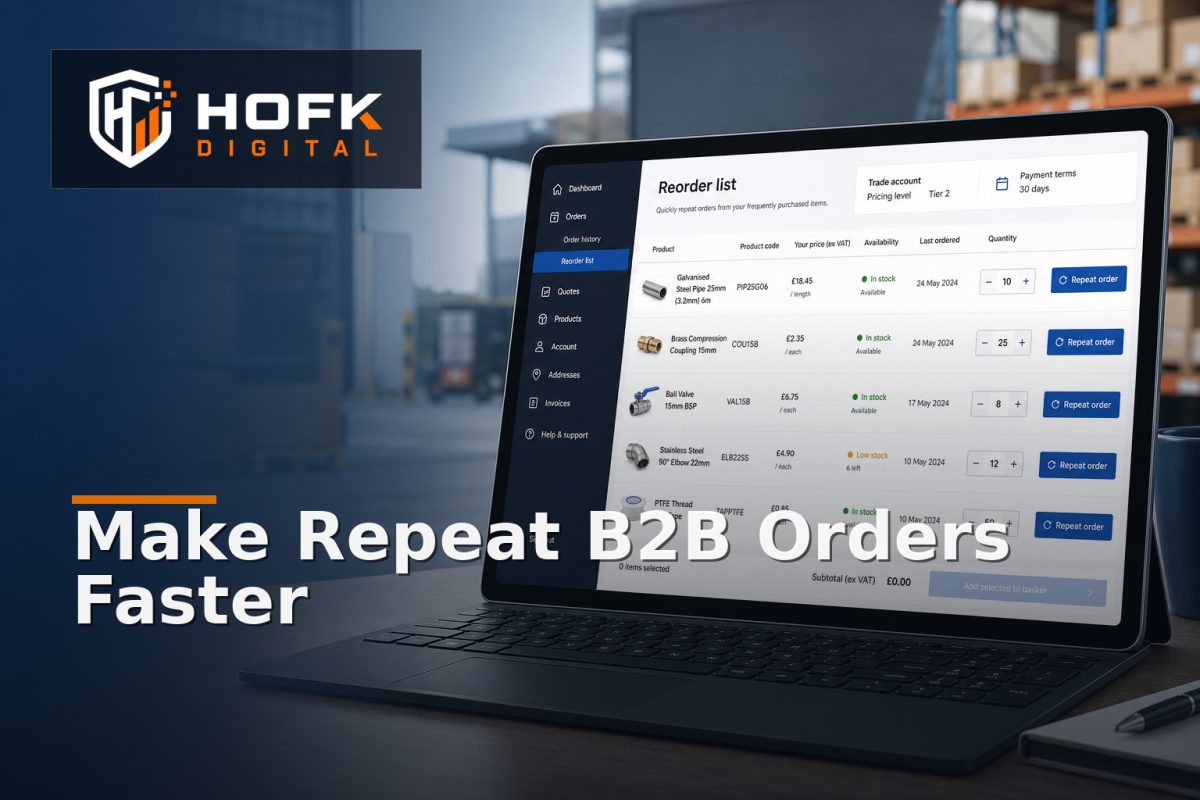
A reorder row may include:
- Product name and SKU.
- Variant, size, colour or pack details.
- Product image where visual confirmation helps.
- Last ordered quantity.
- Current account price.
- Current availability or lead-time message.
- Quantity selector.
- Link to the full product page or specification.
Avoid relying on an internal product name that only makes sense to your staff. The customer should be able to verify that the selected item is the one they intend to order.
Handle price changes transparently
Historical price and current price should never be confused. If the customer previously paid £18.50 but the current account price is £19.20, show the current price clearly and, where useful, indicate that it has changed since the original order.
Do not silently copy an old price into a new order unless your commercial rules explicitly require that behaviour. In most B2B environments, current pricing may depend on account tier, contract terms, quantity breaks, promotions or effective dates.
For each reorder item, decide whether the price is:
- Recalculated when the list loads.
- Recalculated when the item is added to basket.
- Confirmed again at quote or order submission.
- Subject to approval when it differs materially from the previous order.
The exact rule should be agreed with commercial and finance owners. VERIFY: price locking, contract terms and approval thresholds vary by business and platform configuration.
Make unavailable and changed products useful
A reorder list becomes frustrating when it shows a familiar product with no explanation after the customer selects it. Every unavailable or changed item should have a clear next step.
Possible states include:
- Available to reorder.
- Available with a different current price.
- Temporarily unavailable with an expected lead time.
- Discontinued with a recommended replacement.
- Available only through a quote or approval route.
- No longer available for this account or delivery location.
Where a replacement exists, explain the relationship rather than automatically substituting it. The customer may need to confirm compatibility, specification or pack size before proceeding.
Keep the original item visible in the order history even when it can no longer be reordered. Historical accuracy matters for customer service, purchasing teams and account reviews.
Design the quantity interaction for speed
A reorder list should make quantity changes quick but controlled. A simple quantity field may be enough for standard products, while other items need minimum quantities, pack multiples or case sizes.
Test whether the quantity control respects:
- Minimum order quantities.
- Pack or case multiples.
- Maximum quantities or account limits.
- Quantity-based pricing breaks.
- Available stock and backorder rules.
- Decimal quantities where the product allows them.
Show the consequence of a quantity change when it matters. If ordering ten cases moves the account into a different price band, update the unit price and line total before the customer reaches the final order step.
Support partial reorders, not just full repeats
Customers rarely want to repeat every line from an old order. They may need two products today, a different quantity next week and a replacement item for one site only.
Give users control to:
- Select individual lines.
- Change quantities before adding to basket.
- Remove unavailable products from the current reorder.
- Save a partial selection as a reusable list.
- Move selected products into a quote instead of a direct order.
Bulk actions can help larger accounts, but they should not remove clarity. A button labelled “reorder all” should explain how unavailable products, price changes and approval-required items will be handled.
Connect the list to the right B2B repeat purchase workflow
The reorder list is only one step in a wider process. After selection, the portal may need to create a basket, quote, approval request or order. The correct route depends on the account and the products involved.
A practical workflow might be:
- Customer selects products from a previous order or saved list.
- Portal revalidates account, price, availability and quantity rules.
- Unavailable or changed lines are highlighted for review.
- Eligible items are added to the basket.
- Restricted or high-value items are routed to quote or approval.
- Customer reviews delivery and payment context.
- Order or quote is submitted with the reorder source retained.
Store the original order reference or saved-list reference on the new basket or order. This helps customer service and account managers understand how the purchase was created without making the customer explain the history again.
Test the experience with realistic account scenarios
Do not test reorder lists only with an administrator account. Use test accounts that reflect how customers actually buy.
Useful scenarios include:
- A standard trade account repeating an unchanged order.
- An account with customer-specific pricing.
- A branch user ordering for a permitted delivery site.
- An account with delegated or approval-based ordering.
- A previous product that has been discontinued.
- A product with a new pack size or variant structure.
- A reorder containing both direct-order and quote-only products.
Compare what the customer sees with what the basket, order record and downstream system store. Check product identifiers, quantities, prices, delivery details and approval status. HOFK's article on designing a B2B quote workflow covers related controls for preserving context between enquiry, approval and order.
Measure whether repeat ordering is actually improving
A reorder feature should be evaluated by the friction it removes, not simply by whether customers click it.
Useful measures include:
- Percentage of repeat orders started from a reorder list.
- Time from portal login to basket creation.
- Number of manual product searches before order submission.
- Reorder list abandonment rate.
- Items removed because of price or availability changes.
- Orders requiring manual correction after submission.
- Repeat orders routed into quote or approval.
Review customer service feedback alongside analytics. A high reorder-list usage rate may still hide problems if customers regularly contact the team about missing products, incorrect prices or unclear substitutions.
B2B ecommerce reorder lists checklist
Before launching or redesigning the feature, confirm that:
- Customers can select individual products rather than only repeating a full order.
- Product identifiers, variants and pack sizes are clear.
- Current account pricing is displayed and recalculated correctly.
- Availability, discontinued items and replacements have clear states.
- Quantity controls respect minimums, multiples and account rules.
- Approval and quote-only products follow the correct route.
- Parent, branch, delivery and user permissions remain intact.
- The new order retains a useful link to its reorder source.
- Representative account scenarios have been tested on desktop and mobile.
- Usage, abandonment and manual correction are reviewed after launch.
Where HOFK can help
B2B reorder experiences often cross a trade portal, ecommerce platform, CRM, ERP, pricing service and fulfilment workflow. HOFK can help review the account ordering journey, improve the responsive portal experience or build the full stack logic needed to keep product, price and order states aligned.
The practical work may include designing reorder-list states, connecting previous orders to current catalogue records, validating customer-specific pricing, routing approval exceptions or adding monitoring around failed order handoffs. HOFK's ecommerce and full stack development services may be relevant where repeat ordering spans several connected systems.
Conclusion
B2B ecommerce reorder lists can remove one of the most avoidable sources of friction in trade purchasing: rebuilding familiar orders from scratch. The best design does more than copy an old basket. It revalidates the current account, price, product, stock, quantity and approval context before creating the next order.
Start with previous orders and saved products, make partial reorders easy, explain changes clearly and preserve the link between the old purchase and the new one. Then test realistic account scenarios and measure whether the feature reduces search, re-keying and manual correction.
That creates a more dependable trade portal repeat ordering experience and a B2B repeat purchase workflow that is faster for customers without weakening the controls your business needs.
Frequently asked questions
What are B2B ecommerce reorder lists?
They are saved or automatically generated product lists based on previous purchases, account activity or customer-selected favourites. They help trade customers repeat orders without rebuilding them from the full catalogue.
Should a reorder list repeat the original price?
Usually, it should show the current price for the customer’s account and make material changes visible. Whether an accepted quote or contract price is preserved depends on the business rules.
How should discontinued products appear in a reorder list?
Keep the historical item visible for reference, but mark it as unavailable and provide a suitable replacement or contact route where one exists.
Can reorder lists support approval-based ordering?
Yes. Products can be added to a quote or approval request instead of a direct basket when account permissions, value thresholds or product restrictions require review.
What should be measured after launching a reorder feature?
Review usage, time to basket, abandonment, product removals, approval rates and manual corrections. These measures show whether the list is genuinely reducing repeat-order effort.