

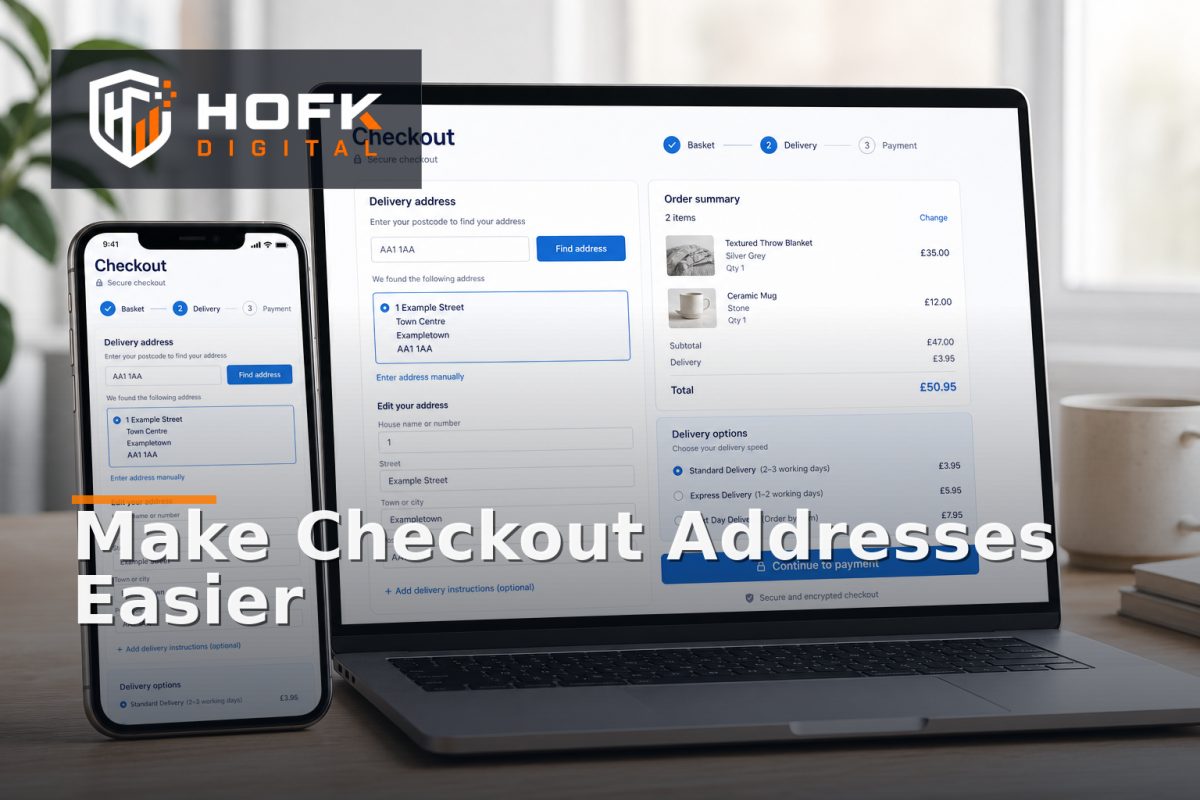
How to Reduce Checkout Address Friction Without Losing Delivery Accuracy
A customer reaches checkout ready to pay, but the address form asks for too much, hides the postcode field below an awkward layout, or returns an address suggestion that cannot be edited properly. The customer hesitates, makes a mistake or leaves.
This is the challenge behind checkout address form optimisation. The goal is not simply to shorten the form. It is to reduce effort while collecting enough reliable information for delivery, fraud checks, tax treatment, customer service and fulfilment.
For UK ecommerce teams, the best approach usually combines a well-designed postcode journey, optional ecommerce address lookup, clear validation and a manual fallback when automated matching is incomplete. This guide explains how to make those decisions without trading convenience for delivery accuracy.
Start with the delivery decision, not the form fields
Before changing the checkout interface, define what the business needs to know to fulfil an order correctly. This varies by product, carrier, customer type and delivery model.
For many UK stores, the address journey may need to capture:
- Recipient or company name
- House number or name
- Street and locality
- Town or city
- County where operationally relevant
- Postcode
- Country
- Delivery instructions, where supported
Do not assume every field needs equal prominence. Some information may be required for a carrier label, while other details may only be useful in exceptional cases. Ask the fulfilment team which fields genuinely affect delivery and which are retained because the form has always included them.
Use postcode lookup without making it compulsory
Postcode lookup can reduce typing, particularly on mobile, but it should be an assistance feature rather than the only route through the form. Customers may have new-build addresses, unusual premises, rural locations, international addresses or formatting issues that prevent a lookup from returning the right result.
A strong lookup journey should let the customer:
- Enter a postcode or partial address.
- Choose from relevant results.
- Review the selected address before continuing.
- Edit the result if a flat, unit, building name or delivery detail is missing.
- Enter the address manually if no suitable result appears.
This is the balance between convenience and delivery address validation. Lookup should reduce repetitive typing, not remove the customer’s ability to correct the record.
Design the address form around progressive disclosure
Showing every possible address field immediately can create checkout form friction. At the same time, hiding important fields until too late can make the process feel unpredictable. Progressive disclosure provides a useful middle ground.
For example, the initial view might ask for country and postcode, then reveal the address options. Once a customer selects an address, the form can show the fields needed to confirm or amend it. Additional fields, such as company name or delivery instructions, can appear where relevant.
Use this approach carefully. A field should not be hidden if customers need it to understand whether the delivery can be completed. The form should also preserve entered information when the customer changes country, switches between lookup and manual entry, or corrects a validation error.
Make lookup results easy to understand and edit
An address lookup is only useful if customers can confidently identify the correct result. Avoid presenting a long, cramped list of near-identical addresses with no clear hierarchy.
Check whether results:
- Show enough detail to distinguish flats, units and buildings.
- Use readable line breaks on mobile screens.
- Remain usable with a keyboard and screen reader.
- Allow the customer to go back and search again.
- Do not replace the selected address with a different version later.
After selection, display the address in a reviewable format. If the customer cannot see what will be printed on the delivery label, they cannot reliably catch an error before payment.
Keep manual entry as a first-class fallback
Manual entry should not feel like a failure state. Some addresses will not be returned by the lookup provider, while others may need information that the provider does not supply. A customer should be able to switch to manual entry without losing the rest of the checkout.
A good fallback should:
- Explain why the address could not be found without blaming the customer.
- Keep the postcode or country already entered where appropriate.
- Show the fields needed to complete the address clearly.
- Use helpful examples rather than restrictive formatting.
- Validate the completed address before submission.
Do not reject a valid-looking address simply because it does not match the lookup provider’s exact format. Delivery address validation should identify genuine risk while allowing an appropriate route for manual review or fulfilment checks.
Reduce validation friction with specific messages
Validation should help the customer recover quickly. Generic messages such as “Invalid address” create uncertainty, especially on mobile where the relevant field may be several screens away.
Use messages that explain the next action:
- “Enter a postcode, for example SW1A 1AA.”
- “Select an address or choose manual entry to continue.”
- “Add a flat or unit number if this address has one.”
- “We cannot deliver to this country from the selected delivery method.”
Keep the customer’s completed information after an error. Losing the entire address because one field was incomplete is a common and avoidable source of checkout form friction.
Validate delivery rules at the right point
An address can be syntactically valid but still unsuitable for a particular delivery service. For example, the selected postcode may require a surcharge, a different carrier, a longer delivery window or a collection option.
Make these rules visible at the point they become relevant. If the customer selects an express service that is not available for the address, explain the reason and offer the available alternatives. Do not let the customer complete payment and discover the restriction afterwards.
Where delivery rules depend on product type, weight, dimensions or stock location, test the combined journey. An address that works for a standard parcel may not work for a large or restricted item. The checkout should reflect the operational rule rather than presenting a generic success state.
Test address flows on mobile and desktop
Address forms often behave differently across devices. On mobile, the keyboard can cover the next button, autocomplete can obscure the form, and a selected address may be difficult to review after the page scrolls.
Test at least these scenarios:
- A returning customer using a saved address.
- A new customer entering a UK postcode.
- A customer selecting a flat or unit address.
- A postcode with no lookup result.
- A manual address with a long street or building name.
- A customer changing country.
- An address that cannot use the selected delivery option.
- A validation error after several fields are complete.
Repeat the important cases on a real phone. Browser resizing can identify layout problems, but it does not fully reproduce touch, keyboard, focus and autofill behaviour.
Measure friction and accuracy together
A shorter address form is not automatically a better form. Track customer effort alongside the quality of the address and the operational outcome.
Useful measures include:
- Address form start and completion rate.
- Lookup usage and manual-entry rate.
- Lookup result selection rate.
- Validation errors by field.
- Address changes after lookup selection.
- Checkout abandonment at the address step.
- Customer-service contacts about delivery addresses.
- Failed deliveries or address corrections after order submission.
Interpret these measures together. A high lookup usage rate may look positive, but if customers frequently edit the result or contact support afterwards, the provider or presentation may need attention. Conversely, a higher manual-entry rate may be acceptable if the resulting delivery records are accurate.
Keep the data flow traceable
The address shown to the customer, the address stored against the order and the address sent to fulfilment should be reconcilable. If different systems normalise or overwrite address lines, record how that happens.
Define which system owns the final order address and which systems can transform it. Check that order confirmation emails, warehouse records, carrier labels and customer-service screens use the intended version. This is particularly important where an ecommerce platform connects to an ERP, fulfilment tool or carrier service.
HOFK’s analytics data dictionary guidance covers related principles around shared definitions and ownership. The same thinking is useful for address fields: agree what each field means before trying to report on it or automate it.
Checkout address form optimisation checklist
Before publishing changes, confirm that:
- Every required address field has a clear operational reason.
- Postcode lookup reduces typing without becoming compulsory.
- Customers can review and edit lookup results.
- Manual entry is available when lookup fails.
- Validation messages explain how to recover.
- Entered data is preserved after errors or state changes.
- Delivery restrictions are shown before payment.
- Address fields work with mobile keyboards and autofill.
- The order, fulfilment and customer-service records remain aligned.
- Address completion and delivery accuracy are measured together.
Where HOFK can help
Address journeys often cross responsive checkout templates, ecommerce platforms, lookup services, delivery rules, ERP connections and fulfilment workflows. HOFK can help review the customer journey, improve the responsive implementation, connect address data more reliably or investigate where the visible address and operational record diverge.
Relevant support may include ecommerce development, mobile-ready design and full stack development. The objective is not to add lookup for its own sake. It is to make the address step easier for customers while giving fulfilment dependable information.
Conclusion
Effective checkout address form optimisation is a balance between speed and certainty. Use postcode lookup to reduce repetitive typing, but keep manual entry available. Let customers review and edit suggested addresses, explain validation errors clearly, and apply delivery rules before payment rather than after it.
Then measure both form completion and delivery accuracy. The best address journey is not necessarily the shortest. It is the one that helps customers complete checkout confidently while giving the warehouse, carrier and customer-service teams a dependable address record.
Frequently asked questions
What is checkout address form optimisation?
Checkout address form optimisation is the process of reducing effort and confusion during address entry while preserving the information needed for accurate delivery and fulfilment.
Should ecommerce address lookup be compulsory?
Usually not. Lookup can reduce typing, but customers should have a clear manual-entry fallback for addresses that are missing, unusual or not returned correctly.
How can I reduce checkout form friction?
Remove fields that are not needed, use progressive disclosure, provide specific validation messages, preserve entered information and test the address journey on real mobile devices.
What does delivery address validation need to check?
It should check that the address is complete and suitable for the selected delivery method, while allowing customers to correct or manually enter details when automated matching is incomplete.
How do I measure whether address optimisation worked?
Compare address-step completion, lookup selection, manual-entry rate, validation errors, checkout abandonment, support contacts and post-order delivery corrections.