

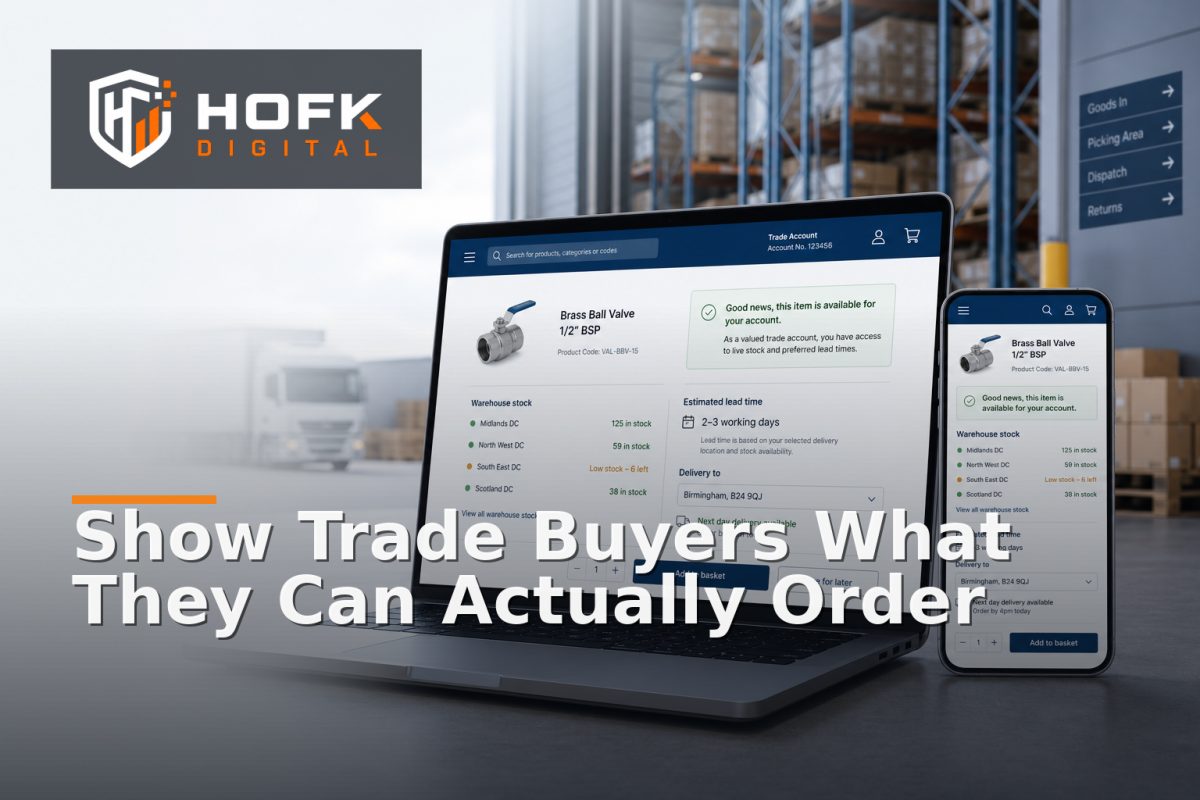
How to Design B2B Product Availability Messages for Account-Specific Stock and Lead Times
A trade customer logs into your portal, selects a product and sees In stock. But which stock? Is it available for their account, their branch and their chosen delivery location? Can it be delivered this week, or does it need to come from another warehouse?
This is the practical challenge behind B2B ecommerce stock availability. A simple stock label may be technically accurate while still failing to answer the buying decision a trade customer needs to make.
Effective messaging should connect account permissions, product availability, delivery capability and lead-time confidence. It should help customers order without forcing them to email the sales team for every exception, while giving operations a clear basis for fulfilling the promise.
Why B2B availability messages need more context
Consumer ecommerce can often use a general stock status because the customer, price and delivery route are relatively standard. B2B ordering is usually more conditional.
Availability may depend on:
- The customer account, price tier or contract.
- The selected branch or approved delivery site.
- The product, variant, quantity or pack size.
- The warehouse or supplier route serving the account.
- Credit, approval or account-ordering permissions.
- Carrier, delivery zone or site-access restrictions.
- Whether the item is stocked, made to order or available from a supplier.
As a result, there is no single universal answer to “Is this product available?” The portal may need to answer a more specific question: Can this account order this product, for this location, with this expected fulfilment route?
Separate the availability concepts before writing the message
The first step is to stop using one label for several different operational states. A useful B2B availability model separates at least four concepts.
Physical stock
How many units exist in a warehouse, branch or supplier location? This is an operational value, but it does not automatically mean the item can be delivered to the customer.
Account eligibility
Is the customer allowed to buy the product? An item may be visible to one account group but restricted for another because of contract terms, market rules, product permissions or approval requirements.
Fulfilment feasibility
Can the business deliver the selected quantity to the chosen site using an available carrier, warehouse or service? An item may be in stock but unsuitable for a particular delivery location.
Lead-time confidence
How certain is the expected despatch or delivery timeframe? A confirmed warehouse allocation is different from an estimate based on supplier availability.
These concepts should be represented in your data model and then translated into customer-facing wording. Do not ask the interface to infer commercial meaning from a single stock quantity.
Design B2B ecommerce stock availability messages around decisions
A good message should tell the buyer what they can do next. Avoid displaying internal system statuses that do not help the customer choose an action.
Useful message states might include:
- Available for your account – the customer can order the selected product under their current permissions.
- Available to order – the product can be ordered but is not necessarily held in immediate warehouse stock.
- Available from [date] – the expected availability is tied to a known date.
- Available subject to confirmation – the request needs operational or commercial review before a firm promise can be made.
- Quote required – the product, quantity or delivery requirement cannot follow the standard ordering route.
- Not available for this account or location – the restriction is specific and should not be presented as a general product failure.
Each state should have a defined next action. That may be Add to basket, Request a quote, Contact your account manager, Choose another delivery site or Notify me, depending on the operation.
Make account-specific product availability visible
Trade portal stock visibility should not create false confidence. If the price or product availability changes after login, make that relationship clear.
For example, a logged-out visitor might see:
Sign in to view account pricing and ordering availability.
After login, the same product might show:
Available for your North West account. Estimated despatch in 2–3 working days.
This is more useful than showing a generic stock badge that does not explain why the customer is seeing a particular result. It also reduces confusion when two users view the same catalogue product but belong to different accounts.
Where account-specific rules apply, test the message across category pages, product pages, the basket and checkout. The account context should not disappear when the customer moves between templates.
Use B2B lead time messaging that reflects confidence
Lead times should communicate both the expected timeframe and the certainty of that timeframe. Avoid presenting an internal estimate as a guaranteed delivery promise.
Examples of useful wording include:
- Despatches within 1 working day – use when the operation can consistently support this expectation.
- Estimated despatch in 3–5 working days – use when the timeframe is an estimate rather than a fixed commitment.
- Supplier lead time: approximately 10 working days – make the source of the longer timeframe clear where useful.
- Delivery date confirmed after order review – use when the destination, quantity or service requirement affects confirmation.
- Available for collection from [location] – use when collection is a practical alternative to delivery.
Be careful with phrases such as “usually available” or “fast delivery”. They sound positive but do not help a buyer plan a project, replenishment order or customer commitment.
Recalculate availability when the account or location changes
Account-specific product availability should be checked again when the customer selects a branch, delivery location or user role. A location can change the available carrier, warehouse route, delivery charge and lead time.
At minimum, revalidate the result when:
- The user signs in or changes account.
- The customer selects a different branch or delivery site.
- The basket quantity changes significantly.
- A restricted or oversized product is added.
- The delivery method or postcode changes.
- Stock changes between product view and order submission.
If the result changes, explain why. A message such as Delivery date changed because this site requires a specialist service is more useful than silently removing the previous delivery option.
Handle mixed baskets honestly
B2B buyers often order several products together. Each item may have a different stock source or lead time, so the basket needs to explain the combined result.
For a mixed basket, consider showing:
- Which lines are ready for despatch.
- Which lines have a longer lead time.
- Whether the order will be split into multiple deliveries.
- Whether the customer can choose to wait for one combined delivery.
- Whether a restricted line requires quote or operational approval.
Do not show the fastest item’s lead time as the promise for the full order. That is a common source of customer-service contacts and manual order amendments.
Keep the portal, ERP and fulfilment records aligned
The customer-facing message should be traceable back to the rule and data that produced it. When an order is queried, your team should be able to see the account, location, stock source, lead-time rule and final message shown at submission.
Useful records to retain include:
- Account and branch reference.
- Selected delivery location.
- Product and variant identifiers.
- Stock or availability source.
- Lead-time value and confidence state.
- Delivery method and any exception reason.
- Rule or calculation used at order submission.
This is particularly important when a trade portal connects to an ERP, PIM, pricing service or fulfilment system. A technically successful synchronisation does not prove that the customer-facing promise and the operational instruction agree.
Test availability with a representative matrix
Before launch, test more than one product and one account. A useful matrix should include:
- Logged-out visitor viewing a standard product.
- Approved trade account with account-specific pricing.
- Account with restricted product access.
- Customer ordering for an approved branch or project site.
- Product in stock at one warehouse but not the serving location.
- Supplier-available product with an estimated lead time.
- Mixed basket with different lead times.
- Product that becomes unavailable between basket and checkout.
- Order requiring manual confirmation or quotation.
For each scenario, compare the product page, basket, checkout, order record, ERP data and fulfilment instruction. Record the expected message, actual message, owner and decision.
Monitor exceptions after launch
Availability messaging needs ongoing monitoring because accounts, products, warehouses, carriers and commercial terms change. Useful measures include:
- Orders amended because availability was inaccurate.
- Customers contacting support about lead times.
- Products shown as available but rejected at checkout.
- Manual overrides of account-specific availability.
- Orders where the portal and ERP show different delivery outcomes.
- Repeated quote requests caused by incomplete availability rules.
Repeated exceptions usually point to a data, rule or ownership problem. The solution may be better product attributes, a revised fulfilment rule or a more reliable integration rather than another wording change.
B2B ecommerce stock availability checklist
- Physical stock, eligibility, fulfilment and lead-time confidence are separate concepts.
- Account-specific availability is rechecked after login and location selection.
- Customer-facing messages explain the next available action.
- Estimated lead times are labelled honestly.
- Mixed baskets show the slowest or most restrictive relevant outcome.
- Product, basket and checkout messages remain consistent.
- Portal, ERP and fulfilment records retain the decision context.
- Representative account, product and exception scenarios have been tested.
- Availability corrections and manual overrides are monitored.
Where HOFK can help
B2B availability messaging often crosses ecommerce platforms, trade portals, ERP or PIM data, pricing rules, responsive templates, delivery services and fulfilment workflows. HOFK can help review the data model, improve the account-aware ordering journey, connect availability data more reliably or build the full stack logic behind clearer exceptions.
Relevant support may include ecommerce development, full stack development, automation and monitoring. The objective is not to display more status labels. It is to help trade customers understand what they can order while giving internal teams dependable information to fulfil it.
Conclusion
Effective B2B ecommerce stock availability messaging is more than an “in stock” label. It connects account permissions, physical stock, delivery capability and lead-time confidence so the customer can make a realistic ordering decision.
Separate the underlying concepts, use clear next actions, show account-specific product availability, label estimates honestly and test the full journey across product pages, baskets, checkout, ERP and fulfilment. Then monitor corrections and exceptions after launch.
When trade portal stock visibility and B2B lead time messaging reflect the real operation, customers receive clearer answers and internal teams spend less time correcting avoidable ordering mistakes.
Frequently asked questions
What is B2B ecommerce stock availability?
It is the process of showing whether a business customer can order a specific product, quantity and delivery option under their account, location and fulfilment rules.
How is account-specific product availability different from general stock?
General stock describes what exists. Account-specific product availability also considers customer permissions, approved locations, pricing terms, delivery capability and account-level restrictions.
What should B2B lead time messaging include?
It should explain the expected despatch or delivery timeframe and whether that timeframe is confirmed, estimated or subject to operational review.
How should a trade portal show mixed-basket lead times?
Show which lines are ready, which have longer lead times and whether the order will be split or held for one combined delivery. Do not show the fastest item’s timeframe as the promise for the whole basket.
When should account-specific availability be rechecked?
Recheck it after login, account or branch changes, delivery-location selection, quantity changes, restricted-product additions and before final order submission.