

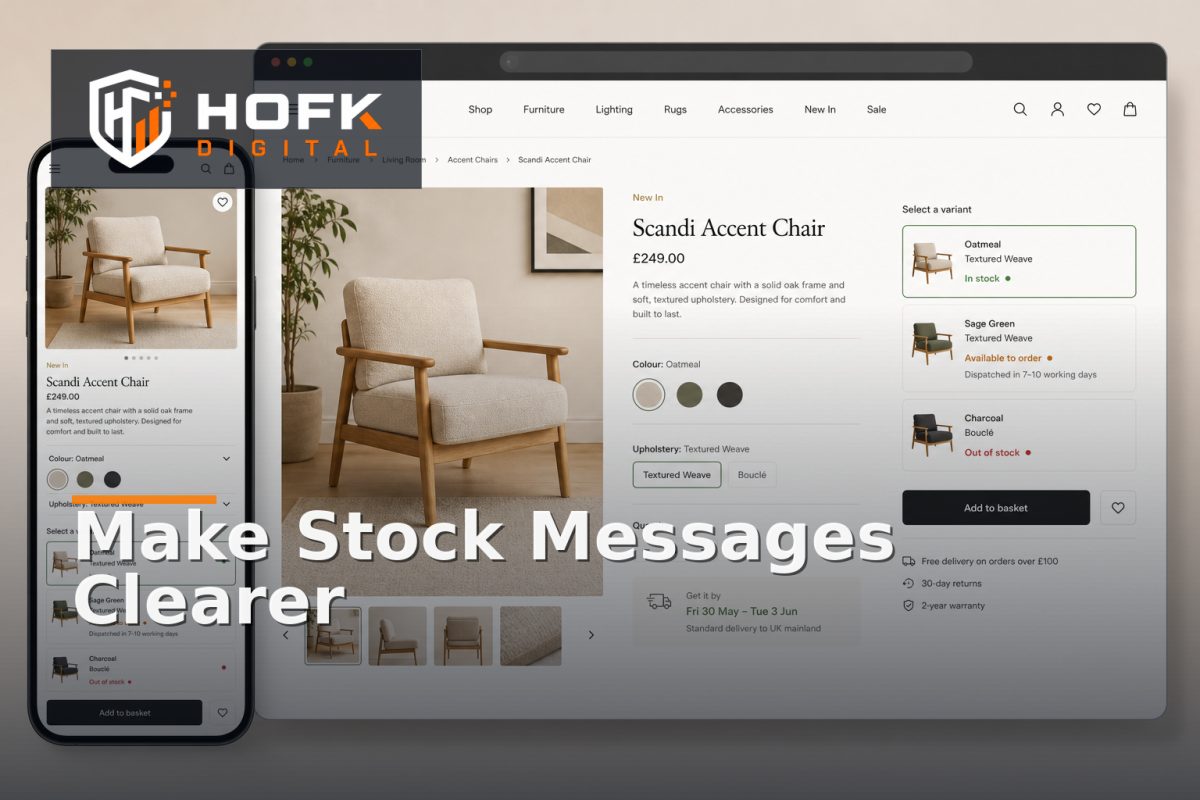
How to Write Ecommerce Stock Availability Messages That Reduce Customer Uncertainty
A shopper lands on a product page, chooses a size or colour and sees a vague message: Available. They still do not know whether the item will arrive tomorrow, whether it is available to order, or whether the page is showing a stock state that may change at checkout.
This uncertainty can slow down a purchase even when the product, price and delivery service are all suitable. Clear ecommerce stock availability messaging helps customers understand what is available, what is expected and what they should do next.
For UK ecommerce merchandising and fulfilment teams, the goal is not to create urgency everywhere. It is to give shoppers an accurate, useful answer at the moment they are deciding whether to add an item to their basket.
What effective stock messaging should tell the shopper
A useful stock message should answer the customer question behind the status. In most cases, that means clarifying four things:
- Can I order this product or variant?
- When is it likely to arrive or become available?
- Is the information certain, estimated or subject to confirmation?
- What should I do if this option is unavailable?
A label such as In stock may be technically accurate, but it does not always provide enough buying confidence. Depending on your fulfilment model, a more useful message might be In stock and ready to despatch, Available for delivery from Thursday or Available to order; estimated despatch in 3–5 working days.
Only use wording your operation can support consistently. VERIFY the exact delivery and despatch promises against your warehouse process, carriers, product types and customer policies.
Separate stock status from delivery expectation
One of the most common causes of confusion is combining stock and delivery into one vague label. Stock status tells the shopper whether the item is available to sell. Delivery messaging tells them what happens after they place the order. They are related, but not identical.
For example, a product can be physically in stock but have a longer delivery time because it is held at another location. Another item may be available to order from a supplier even though it is not currently in your warehouse.
Consider showing the two pieces of information separately:
- Stock: In stock
- Delivery: Despatches within 1 working day
Or:
- Stock: Available to order
- Delivery: Estimated delivery in 5–7 working days
This structure makes the customer-facing message more precise and gives fulfilment teams a clearer basis for reviewing exceptions.
Use a clear message hierarchy on product pages
Stock status on product pages should be easy to find without competing with the product name, price or primary action. A customer should not need to scroll through specifications or open an accordion to discover whether the selected variant can be ordered.
A practical hierarchy is:
- Selected variant and price
- Availability or stock message
- Delivery estimate or restriction
- Quantity and add-to-basket action
- Additional detail, such as collection, backorder or notification options
Place the message close to the variant selector and add-to-basket control. If choosing a size or colour changes availability, update the message immediately and make the selected option obvious.
This is particularly important for mobile users. A shopper may select a variant from a compact drawer or dropdown, then tap the main action quickly. If the availability message updates somewhere else on the page, the customer may miss the change.
Write product availability messages for real buying decisions
Different stock conditions need different wording. Avoid using one generic status for every situation.
In stock and ready to despatch
Use this when the item is physically available and the fulfilment process supports prompt despatch. If there is a meaningful cut-off time, explain it carefully rather than implying guaranteed arrival.
Low stock
Low-stock messaging can help customers make a decision, but it should be factual rather than artificially urgent. Only 2 remaining is useful when the figure is reliable and applies to the selected variant. A vague message such as Hurry, selling fast may create doubt if it appears across most of the catalogue.
Available to order
This message is useful when the product can be ordered but is not necessarily held in immediate warehouse stock. Add an estimated despatch or delivery timeframe where it is dependable.
Pre-order
Explain what pre-order means in your process. Include the expected release or despatch timeframe and clarify whether the customer will receive the whole order together or in separate shipments. VERIFY the wording against your approved pre-order and fulfilment policy.
Temporarily unavailable
A temporary unavailability message should explain whether the product is expected to return. If you know the expected date, show it as an estimate rather than a promise unless it is confirmed operationally.
Out of stock
Good out of stock ecommerce UX does not stop at displaying Out of stock. Offer the next useful action, such as selecting another variant, joining a back-in-stock notification list, viewing a replacement or contacting the team where a manual route exists.
Make unavailable variants understandable
Variant-level availability is more useful than a product-level message that hides the detail. If a product has six colours and only one is unavailable, do not make the whole product appear unavailable. Show the available and unavailable options clearly.
Useful controls include:
- Disabling unavailable variants while keeping them visible for reference
- Explaining why an option cannot currently be selected
- Updating price, image, delivery and stock when a variant changes
- Providing a replacement or notification route where appropriate
Do not silently switch the customer to another variant. An automatic substitution may create an incorrect order, especially where size, compatibility, colour or pack quantity matters.
Keep stock messages consistent across the journey
Customers lose confidence when the product page, basket and checkout tell different stories. Before publishing new product availability messages, test the complete path:
- Product listing or category page
- Product detail page
- Variant selection
- Basket
- Delivery selection
- Order review and confirmation
Check that the selected SKU, price, stock message and delivery expectation remain aligned. A product page may say Available for next-day delivery while the checkout removes that option after a postcode is entered. That may be a valid operational rule, but the change should be explained before payment.
HOFK's guide to checkout address form optimisation covers related principles for validating delivery information without creating unnecessary form friction.
Use uncertainty honestly instead of hiding it
Some stock and delivery information is estimated. That is acceptable if the message makes the level of certainty clear. Avoid turning an internal planning estimate into a customer promise.
Useful phrases include:
- Estimated despatch in 2–3 working days
- Expected back in stock late October
- Delivery date confirmed at checkout
- Available subject to final stock confirmation
Do not add an estimate simply because the interface looks incomplete without one. A clear message saying that confirmation is required is more trustworthy than a precise date the business cannot reliably meet.
Monitor the questions and corrections messages create
Customer service contacts are valuable evidence about whether product availability messages are working. Track questions such as:
- When will this item actually arrive?
- Can I order this size or colour?
- Why did the delivery option disappear?
- Is this product available at a particular location?
- Can I be notified when it returns?
Repeated questions may indicate missing information, inconsistent stock data or wording that does not match the customer's decision. Also monitor orders amended because of availability, delivery complaints and products frequently removed from baskets.
HOFK's guide to designing an ecommerce returns process explains why customer-service and operational data should be connected to wider ecommerce workflow improvements.
Ecommerce stock availability messaging checklist
Before changing stock status on product pages, confirm that:
- The selected variant's availability is shown clearly.
- Stock status is separated from delivery expectation where needed.
- Messages use plain language and avoid unsupported urgency.
- Estimated dates are labelled as estimates.
- Unavailable variants have a useful next action.
- Product, basket and checkout messages agree.
- Mobile users can see the status near the main action.
- Customer-service questions and order corrections are monitored.
- Stock and delivery rules have named operational owners.
Where HOFK can help
Availability messaging often sits between catalogue data, ecommerce templates, ERP or fulfilment systems, delivery rules and responsive design. HOFK can help review the customer journey, improve the implementation or connect product, stock and operational data more reliably.
Relevant support may include ecommerce development, full stack development, mobile-ready design and practical monitoring. The aim is not to add more messages. It is to make the right message appear consistently at the point where the customer needs certainty.
Conclusion
Good ecommerce stock availability messaging reduces uncertainty by explaining whether the selected item can be ordered, when it is likely to arrive and what the customer should do if it is unavailable.
Separate stock status from delivery expectation, write product availability messages for real buying decisions, keep variant states clear and test the complete journey from product page to confirmation. Then use customer questions, order corrections and monitoring data to improve the wording and the underlying workflow.
The best stock message is not the most urgent or detailed one. It is the most accurate message that helps the shopper make a confident decision.
Frequently asked questions
What is ecommerce stock availability messaging?
It is the customer-facing wording that explains whether a product or variant is available, when it is expected to arrive or despatch, and what the shopper can do next.
What should product availability messages include?
They should normally clarify whether the selected item can be ordered, whether the timeframe is confirmed or estimated, and what action is available if the item is unavailable.
How can out of stock ecommerce UX be improved?
Show which variant is unavailable, offer a back-in-stock notification or suitable replacement where appropriate, and avoid leaving the customer at a dead end.
Where should stock status appear on product pages?
Place it close to the selected variant, price and add-to-basket control. On mobile, make sure it remains visible after variant selection and does not sit below an unclear or competing action.
How can ecommerce teams test stock messaging?
Test in-stock, low-stock, unavailable, pre-order and delivery-restricted scenarios across product pages, baskets and checkout. Compare the customer-facing message with the actual operational rule.