

How to Detect Basket State Divergence Between Product Pages, Cart APIs and Analytics Before Checkout Breaks
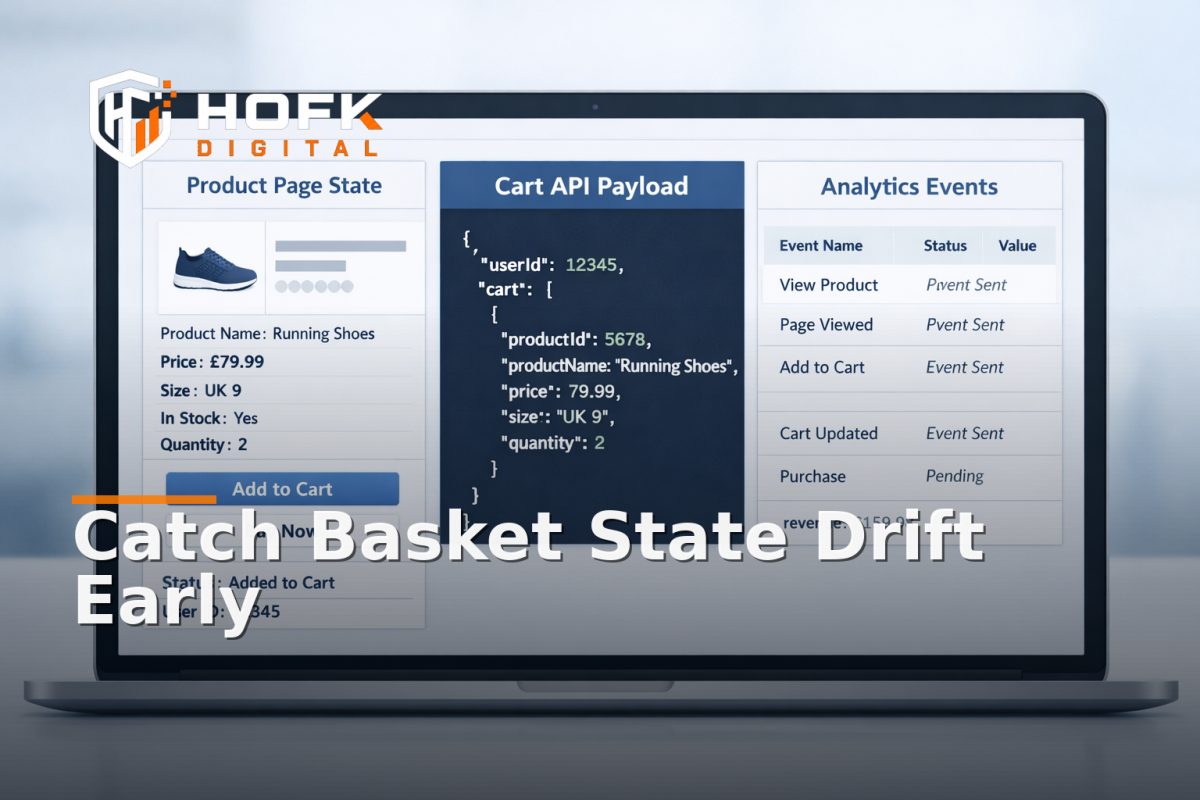
If a shopper adds a product, then the basket shows a different variant, quantity or price, you are not dealing with a simple add to basket bug. You are dealing with basket state drift: a mismatch between what the frontend thinks is in the basket, what the cart API accepted, and what analytics recorded.
That kind of issue is easy to miss in headless, SPA and variant-heavy ecommerce stacks because each layer can look correct on its own. The product page renders. The cart endpoint returns 200. The analytics event fires. But the state does not line up, and the problem only becomes obvious when checkout, reporting or customer service starts to disagree.
This article is for developers, QA teams and technical delivery leads who need a practical way to detect basket state divergence before checkout breaks. The focus is on instrumentation, logging and reconciliation, not on conversion tactics or merchandising.
What basket state drift actually looks like
Basket state drift happens when the same basket is represented differently in different systems. In a healthy setup, the selected product state on the page, the cart API payload, and the analytics event should all describe the same item, quantity, price and variant.
When drift occurs, you may see one or more of these symptoms:
- The page shows Size M, but the cart contains Size L.
- The frontend quantity is 2, but the API stores 1.
- The page shows a promo price, but the cart API still uses the full price.
- The analytics event records the parent SKU, not the selected variant.
- The basket drawer updates, but checkout receives a stale line item.
- A mobile user taps add to basket twice and only one event is tracked.
The key point is that the bug is often not in the individual component. It is in the handoff between state layers.
Start by defining one source of truth for basket state
Before you write logs or tests, decide which layer owns the canonical basket state at each moment. In SPA and headless ecommerce builds, this is often where teams become inconsistent.
A useful model is:
- Frontend selection state - what the user has chosen on the product page.
- Cart API state - what the backend has accepted and persisted.
- Analytics state - what tracking systems report.
You do not need all three to be identical at every millisecond, but you do need a defined order of truth. Usually, the cart API should be the source of truth after the add-to-basket action completes. The frontend can be optimistic, but it should reconcile against the API response.
If you cannot answer the question “which state wins when they differ?”, then basket state drift will be harder to detect and harder to debug.
Instrument the product page state before the add-to-basket call
Most basket state tracking problems begin on the product page, especially where variants, bundles or configuration options are involved. Product page state persistence needs to be visible, serialisable and testable before the user clicks anything.
Log the selected state explicitly
Capture the exact state the user sees before the add-to-basket call is made. At minimum, log:
- product or parent SKU
- selected variant SKU or option IDs
- quantity
- price as displayed
- promotional price or discount state
- currency
- product page URL
- session or basket reference
Store this in a structured event object rather than a free-text message. That makes comparison much easier later.
Use a correlation ID
Every add-to-basket attempt should carry the same correlation ID through the frontend event, the cart API request and the analytics event. Without it, you can see that mismatches happened, but not whether they were part of the same user action.
If you already use request IDs or trace headers, reuse them where possible. If not, generate a basket action ID on the client and pass it through the whole flow.
Compare the three layers at the moment of add-to-basket
The fastest way to catch basket state drift is to compare the frontend, API and analytics states immediately after each basket action. Do not wait for overnight reports. Catch the mismatch while the user journey is still fresh.
1. Compare frontend state to the request payload
When the user clicks add to basket, inspect the request payload. Confirm that it matches the product page state exactly. This is where an add to basket bug often appears first.
Check whether the payload includes:
- the selected SKU or variant ID
- the correct quantity
- the correct price context, if your API requires it
- any custom options, engraving or bundle components
- the basket or customer reference
If the payload is wrong, the bug sits in the frontend state handling or the component event wiring.
2. Compare request payload to API response
Do not assume the API accepted the exact thing you sent. Some cart systems normalise, enrich or override item data. That may be fine, but it should be deliberate and visible.
Confirm that the response contains the same core identity as the request:
- same SKU or variant ID
- same quantity
- same unit price or expected recalculation
- same discount treatment
- same basket line reference
If the API response differs, the issue may be in server-side basket rules, promotion logic or item transformation.
3. Compare API state to analytics state
Analytics often lags behind by design, but it should still tell the same story. The event should describe the same basket item that the API accepted.
Useful fields to include in your ecommerce basket tracking events:
- item_id
- item_name
- variant_id or SKU
- quantity
- price
- currency
- basket_action_id
- page_type or component context
If analytics records a parent product while the cart contains a variant, reporting will be misleading even if the checkout still works.
Build a reconciliation log, not just event tracking
Event tracking tells you that something happened. Reconciliation logging tells you whether the same thing happened everywhere.
A reconciliation log should compare:
- frontend selected state
- request payload
- API response
- analytics event
For each basket action, record whether each layer matched. A simple pass or fail table is often enough for initial debugging.
For example:
- Frontend: Size L, qty 2, sale price £35
- Request: Size L, qty 2, sale price £35
- API: Size L, qty 2, sale price £35
- Analytics: Parent SKU only, qty 2, sale price £35
That example shows the cart is probably fine, but basket tracking is not. Without the log, the mismatch might be blamed on checkout or reporting later.
Watch for the usual causes of basket state drift
Basket state drift tends to repeat in a few familiar ways.
Frontend causes
- Variant state stored only in local component state
- State reset after a re-render or route change
- Optimistic UI updates that never reconcile
- Duplicate event handlers firing on the same tap
- Mobile interactions not updating the same state path as desktop
API and backend causes
- Cart endpoints recalculating price differently from the page
- Variant IDs being mapped to the wrong product record
- Promotion rules overwriting the visible basket state
- Session or basket reference changes between steps
- Caching returning stale cart data
Analytics causes
- Events firing before the API response is confirmed
- Wrong item identifier passed to the data layer
- Stale ecommerce object reused from a previous state
- Consent or tag manager timing changing the event order
- Duplicate add-to-basket events from the same interaction
These are exactly the sort of issues that make basket state tracking unreliable unless the system is explicitly instrumented for reconciliation.
Test state persistence across the product page journey
Product page state persistence is not just about the first click. It is about whether the chosen item survives the journey the shopper takes around the page.
Test these scenarios:
- select a variant, scroll, then add to basket
- select a variant, open a size guide, then add to basket
- select a variant, use the browser back button, then add to basket
- select a variant on mobile, rotate the device, then add to basket
- select a variant, wait for a promotional banner to re-render, then add to basket
If the selected state changes at any point, the page is not persisting basket-relevant state reliably.
Use synthetic tests and session replays together
One test method is not enough. Synthetic tests can prove the mechanics. Session replay or real-user monitoring can show how drift happens in practice.
A useful setup is:
- Synthetic journey tests - automated checks that compare the page state, API response and analytics payload for known products.
- Session replay - visual evidence of where the user tapped, what the page showed and when the state changed.
- Server logs - confirmation of the exact basket payload and response.
Together, these help you separate an isolated frontend bug from a more systemic state-handling problem.
Design your alerts around mismatches, not just errors
Basket state drift often does not trigger a hard failure. That is why error-only monitoring misses it. You need alerts that fire when states disagree, even if the request succeeds.
Examples of useful alerts include:
- frontend SKU differs from cart API SKU
- analytics item ID differs from cart API item ID
- quantity changes between click and response
- price mismatch between product page and cart response
- basket action completed with no matching analytics event
This is where website monitoring becomes more valuable than basic uptime checks. You are not just asking whether the site is up. You are asking whether the transaction state is still coherent.
A practical debugging sequence for basket state drift
If you need to triage a live issue, use this order:
- Pick one product and one variant that is known to reproduce the problem.
- Capture the frontend state before add to basket.
- Record the exact API request and response.
- Inspect the analytics event payload.
- Compare all three against the same basket action ID.
- Check whether the mismatch happens on one device, browser or breakpoint only.
- Determine whether the first divergence is in the frontend, API or analytics layer.
That sequence is usually enough to assign the issue to the right owner without guesswork.
What good looks like
A stable basket flow in an SPA or headless stack should be boring in the best possible way. The selected product state should persist, the cart API should accept the same thing the user saw, and the analytics event should describe the same basket item.
In a healthy setup:
- the frontend and API agree on product identity
- the API response confirms the same quantity and price context
- analytics records the same variant the cart accepted
- retries do not create duplicate basket lines
- mobile and desktop behave consistently where they should
If those conditions are true, checkout has a much better chance of receiving a clean handoff.
Why this matters commercially
Basket state drift is easy to dismiss as a technical detail, but it affects more than one team. Developers see the bug. QA sees the inconsistency. Marketing sees poor basket tracking. Operations may see the wrong item in fulfilment or support. The commercial cost is that the data, the basket and the customer story no longer match.
That is why this issue is worth instrumenting properly. If you can detect it early, you reduce debugging time, improve ecommerce basket tracking and make checkout failures easier to isolate.
Where HOFK can help
HOFK works across ecommerce, full stack development, website monitoring, responsive websites, SEO and Google Ads support. In projects like this, the useful work is often not a generic redesign. It is tracing where the state begins to diverge, adding the right logging, and making the cart flow easier to trust and monitor.
For more complex stacks, that may mean aligning frontend state handling, API responses and analytics events so the basket tells one consistent story from product page to checkout. It can also mean adding monitoring around the exact points where basket state drift tends to start.
Conclusion
If you want to catch basket state drift before checkout breaks, do not rely on the visible basket alone. Compare the frontend state, cart API payload and analytics event for the same action, then log the differences with a shared correlation ID. That is the most reliable way to detect basket state divergence in SPA, headless and variant-heavy ecommerce stacks.
Once you instrument for reconciliation, basket issues become much easier to trace, easier to assign and easier to fix. If your store needs a more technical review of ecommerce basket tracking, product page state persistence or an add to basket bug that keeps returning, HOFK can help with full stack development, ecommerce support and monitoring where implementation detail matters. Basket state drift is easiest to solve when you can see exactly where the state first stopped matching.
Frequently Asked Questions
What is basket state drift?
Basket state drift is when the same basket action is represented differently in the frontend, cart API and analytics. For example, the page shows one variant, but the cart stores another.
What is the best way to detect a basket state mismatch?
Compare the frontend state, API payload, API response and analytics event for the same add-to-basket action. A shared correlation ID makes this much easier.
Why does basket state drift happen in SPA and headless stacks?
Because the state is often split across multiple layers. If the frontend re-renders, the API recalculates, or analytics fires too early, the layers can stop agreeing.
Is basket state drift the same as an add to basket bug?
Not always. An add to basket bug usually stops the action working. Basket state drift can happen even when the action appears successful, because different systems record different versions of the same basket.
What should I log to troubleshoot product page state persistence?
Log the selected SKU or variant, quantity, price, basket action ID, request payload, API response and analytics item data. That gives you a clear audit trail for comparison.