

How to Deduplicate Product Records Before They Pollute Ecommerce Catalogues and Feeds
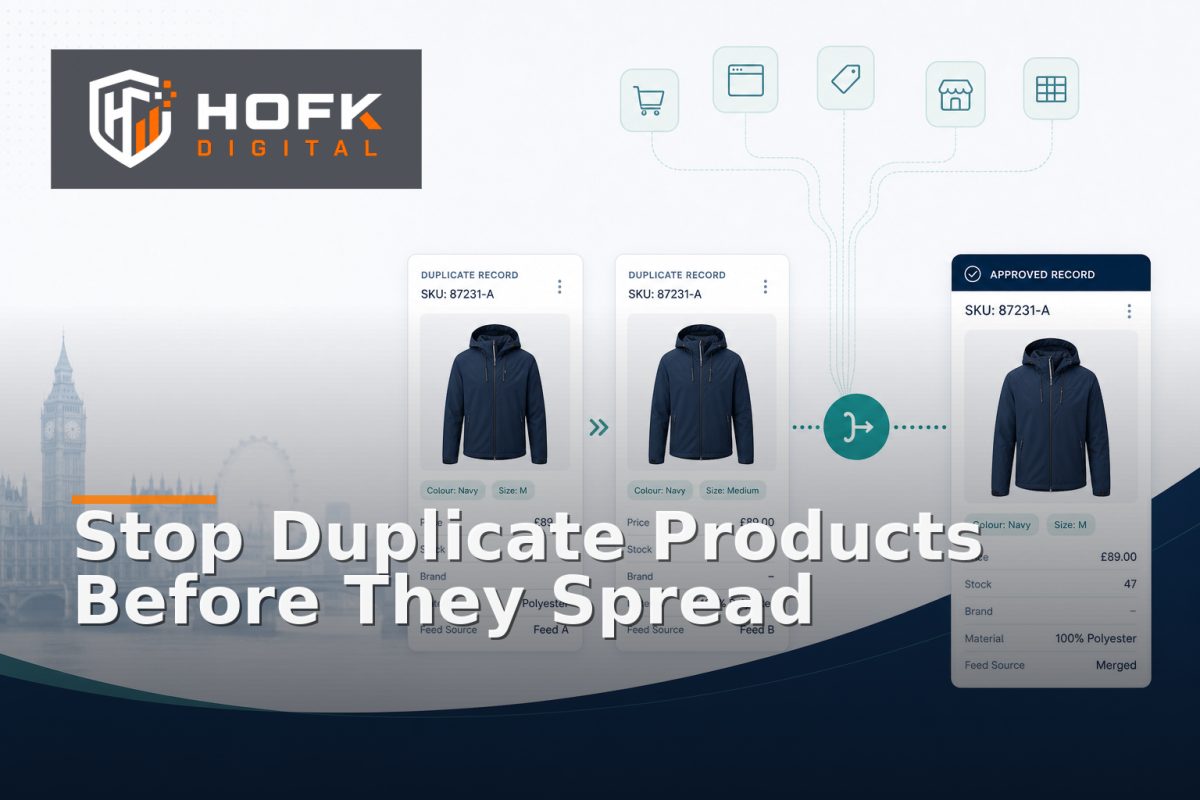
A catalogue can contain duplicate product records for months before anyone notices. One version may appear in search, another may be connected to stock, and a third may be exported to a merchant feed. Customers see similar products, internal teams see conflicting data, and reporting starts counting the same commercial item more than once.
This often happens after a supplier change, ERP migration, marketplace import, acquisition or catalogue merge. The records may not be identical. One could use a different SKU format, another may have a slightly changed title, and a third may represent a variant rather than a genuinely separate product.
Ecommerce product catalogue deduplication is the process of identifying those overlaps, deciding which records represent the same sellable item, and consolidating them without losing approved content, stock history or useful identifiers. Done properly, it is a controlled data-cleaning exercise rather than a risky bulk delete.
Why duplicate product records create commercial problems
Duplicate records do more than make an admin screen untidy. They can affect almost every part of the ecommerce operation:
- Search results may show several versions of the same product.
- Category pages may contain repeated or near-identical listings.
- Customers may choose the wrong record, variant or pack size.
- Stock can be split across records that should share one sellable identity.
- Merchant feeds may export duplicate offers or conflicting prices.
- Analytics and reporting may treat one product as several items.
- SEO signals, reviews and backlinks may be divided between URLs.
- Customer-service and fulfilment teams may use different product references.
The risk is highest when a duplicate record is live in one system but not another. A storefront may show two products while the ERP recognises only one, or a feed may export an old SKU after the catalogue team has adopted a newer reference.
Start with a catalogue inventory before merging anything
Do not begin by deleting records that look similar. First create an inventory of the product data you are working with. This is particularly important when cleaning an inherited or merged catalogue because the same product may have several legitimate identifiers.
Useful inventory fields include:
- Internal product ID.
- Parent product and variant IDs.
- SKU and supplier reference.
- GTIN, barcode or MPN where available.
- Product title and brand.
- Variant attributes such as size, colour, capacity or pack quantity.
- Current price, stock state and channel status.
- Product URL, image references and category assignments.
- Source system and import date.
- Last modified date and current owner.
This inventory gives you evidence before decisions are made. It also helps distinguish a true duplicate from two similar products that should remain separate.
Define what counts as a duplicate
A duplicate is not simply two records with similar names. Before building matching rules, agree the business definition. A useful classification has at least four outcomes.
Exact duplicate
Two records represent the same sellable item and share a reliable identifier, such as the same approved SKU or GTIN. These are usually the safest records to consolidate, provided the identifier itself has not been reused incorrectly.
Probable duplicate
The records have different identifiers but strongly match on brand, model, dimensions, product type and other attributes. These need review before merging because one source may contain more complete or newer information.
Variant relationship
Two records are not duplicates but belong to one parent product. For example, separate records for a red, medium shirt may need to become variants under one catalogue product rather than remain as unrelated listings.
Genuinely separate product
The records look similar but differ in a commercially important way, such as pack quantity, compatibility, specification, warranty or intended use. These should remain separate even if the names are close.
This classification prevents an aggressive clean-up from merging products that customers, warehouses or feeds need to distinguish.
Use a matching hierarchy for duplicate product records
Matching works best when the strongest evidence is checked first. Do not rely on product-title similarity as the main rule, particularly in technical, trade or multi-supplier catalogues.
- Exact approved identifier: match on a trusted SKU, GTIN or manufacturer reference where ownership is clear.
- Supplier and manufacturer combination: compare supplier ID, manufacturer, model and external reference.
- Normalised attributes: compare brand, product type, dimensions, material, capacity and pack quantity after standardising units and vocabulary.
- Variant attributes: confirm size, colour, finish, compatibility or configuration before treating two records as equivalent.
- Title and description similarity: use this as supporting evidence, not final proof.
- Image comparison: helpful as a review aid, but not a reliable identity key on its own.
Each matching rule should produce a confidence level. High-confidence exact matches may be suitable for controlled processing. Medium-confidence matches should enter a review queue. Low-confidence matches should remain separate until a catalogue owner confirms the relationship.
Be careful with SKU deduplication
Product SKU deduplication sounds straightforward, but SKU formats are often less reliable than teams assume. A supplier may reuse a code, add prefixes during an import, or use one reference for a product family while your warehouse needs a code for each sellable variant.
Before treating a SKU as a unique identity, check:
- Whether the SKU is unique across all suppliers and brands.
- Whether formatting differences are meaningful or cosmetic.
- Whether a parent SKU and child variant SKU are being confused.
- Whether historical orders use the old or new reference.
- Whether stock, pricing and fulfilment systems use the same identifier.
Keep old identifiers as aliases or historical references where possible. Removing them completely can make order support, returns and reporting harder later.
Create a review queue instead of editing live records directly
A safe deduplication process separates proposed decisions from approved catalogue data. Store the potential match, confidence score, evidence and proposed action in a review queue.
A useful review record should show:
- Record A and record B.
- Why they were matched.
- Fields that agree and fields that conflict.
- Which source is proposed as the surviving record.
- What happens to the other record.
- Impact on URLs, orders, stock, feeds and reporting.
- Reviewer, decision, date and notes.
This makes catalogue data cleansing auditable. It also gives a product owner the chance to reject a technically plausible match that would create a commercial problem.
Choose the surviving record using field-level rules
There is rarely one record that is best for every field. One source may have the correct stock reference, while another contains approved product copy, better images or a stronger URL.
Define the surviving record and field ownership separately. For example:
- Use the operational system for stock, availability and fulfilment identifiers.
- Use the approved catalogue for customer-facing titles and descriptions.
- Use the latest verified technical document for specifications.
- Retain the strongest existing URL where it has useful traffic or links.
- Preserve reviews, order history and redirects rather than discarding them.
These rules should be agreed before bulk merging. HOFK’s guidance on product attribute conflict management covers related principles for deciding which source should control conflicting fields.
Plan the merge impact across connected systems
A merge is not complete when two rows become one in a product database. Review every system that uses the record:
- Ecommerce product and variant records.
- ERP, PIM, warehouse or fulfilment references.
- Category and filter assignments.
- Product URLs and redirects.
- Merchant Centre and marketplace feeds.
- Analytics item IDs and reporting dimensions.
- Customer-service, order and return history.
Where the product model is unclear, separate parent products, sellable variants, offers and stock records before merging. HOFK’s article on modelling ecommerce product variants provides useful context for keeping these concepts distinct.
Test deduplication with representative scenarios
Before processing the full catalogue, test the rules against a controlled sample:
- Two exact duplicates with the same trusted identifier.
- Two records with different SKU formats.
- A parent product and two legitimate variants.
- Two similar products with different pack quantities.
- A discontinued record with historical orders.
- A duplicate where one record has the stronger URL and reviews.
- A product that appears in an active shopping feed.
For each test, check the storefront, basket, order record, stock view, feed output and reporting reference. Do not approve the process because the database looks cleaner. Approve it when the customer and operational journeys remain accurate.
Monitor after catalogue data cleansing
Duplicate records can return if imports, supplier feeds or manual catalogue changes are not governed. After the clean-up, monitor:
- New records that match existing identifiers.
- Products with similar titles and identical technical attributes.
- Duplicate SKUs across suppliers or channels.
- Sudden increases in catalogue size.
- Feed products with missing parent or variant relationships.
- Products redirected or retired without an approved decision.
Set an exception threshold for unusual imports. If a supplier normally adds 20 products but suddenly proposes 2,000, pause the process for review rather than allowing the catalogue to expand unchecked.
Ecommerce product catalogue deduplication checklist
- Create a full product and variant inventory before merging.
- Define exact, probable, variant and separate-product outcomes.
- Use trusted identifiers before title similarity.
- Assign confidence levels to proposed matches.
- Keep proposed and approved values separate.
- Choose surviving records using field-level ownership rules.
- Preserve URLs, order history, reviews and operational references.
- Test storefront, stock, basket, feeds and reporting after a sample merge.
- Monitor new imports for duplicate patterns.
- Give catalogue data cleansing a named owner and review process.
Where HOFK can help
Deduplication often crosses ecommerce platforms, supplier imports, PIM or ERP data, product feeds, search, redirects and operational workflows. HOFK can help review the data model, build matching and validation logic, improve catalogue workflows or add monitoring around unusual product changes.
Relevant support may include ecommerce development and support, full stack development, automation and technical data-flow improvements. The aim is not to merge everything that looks similar. It is to make product identity clearer, more dependable and easier to maintain.
Conclusion
Ecommerce product catalogue deduplication should be treated as a controlled identity and governance problem, not a bulk deletion exercise. Build an inventory, define what counts as a duplicate, match records using reliable evidence, preserve historical references and review the impact across feeds, stock, URLs and reporting.
Good catalogue data cleansing leaves the business with fewer confusing records, clearer product relationships and a safer foundation for future imports. If duplicate product records are already affecting your catalogue or feeds, HOFK can help review the technical and operational workflow behind a more dependable clean-up.
Frequently asked questions
What is ecommerce product catalogue deduplication?
It is the process of identifying product records that represent the same item, deciding which record should survive and consolidating the data without losing important history or relationships.
How can I identify duplicate product records?
Start with trusted identifiers such as SKU, GTIN or manufacturer reference, then compare normalised attributes, variants, supplier references and titles. Use confidence levels and human review for uncertain matches.
Should similar SKUs always be merged?
No. Similar SKU formats may represent different variants, pack quantities, suppliers or operational items. Confirm the commercial and fulfilment identity before merging.
What is the safest way to merge product records?
Use a review queue, keep proposed values separate from approved values, choose field-level sources of truth, preserve URLs and history, and test the result across storefront, stock, feeds and orders.
How do I stop duplicate products returning?
Add matching and validation rules to supplier imports, monitor unusual catalogue growth and give one owner responsibility for product identity and ongoing catalogue governance.